There's no any particular cpm rate, all the rates are highly dynamic and different for each site and user. tech news: mobile  
lasted technology news
news...
 
Showing posts with label mobile. Show all posts

Sunday, July 16, 2017

25 Apps College Students Shouldn't Live Without

The truth of our modern times is that you probably won’t find a student who does not use innovative gadgets today. It is also true that students use different mobile applications not only for entertainment, but for studying as well. Both Apple and Android provide dozens of programs and apps for college students that can be very informative and useful if you want to keep up with the times and boost your studying process. Every student probably knows plenty of applications that fit his or her needs most, but there are still some mobile “helpers” no student should live without. We are here to tell you about 25 of them.

1. Any.do

Millions of people use Any.Do to organize their tasks. This application is perfect for students who need to create a to-do list. It also synchronize all tasks with other devices so that the list can be accessed from anywhere. Add new entries to the list with the help of touch-based interface, or use your voice to create tasks.
You can change the priority of your entry, mark a task as completed, or even shake your device to remove all completed tasks from it. The Any.Do widget can be added to your home screen for quick and easy access.

2. Mailbox

Do you often have troubles with your email? Is it frustrating to control your inbox because it lacks features? Then it’s high time to download Mailbox to your mobile device and forget about all these problems at once.
Different swipe commands will help you keep your inbox clean, archive the emails you’ve already read, set various reminders, work with several emails at the same time, and always stay on the top of your inbox despite the constant stream of incoming messages college students often face.


No college student will be afraid of losing his notes or coursework anymore! Thanks to Dropbox, you have a chance to upload different files (documents, photos, videos) in the cloud and get them online whenever you need, even if you forget your phone at home. The only thing needed to access your files is an Internet connection.
Store your files in Dropbox, and share them with friends without any fear of losing important and useful data.


4. Feed.ly

College students always want to know everything and keep their eyes on the ball, but it may be quite difficult to do because of constant deadlines, part-time jobs, overdue essays, exams, etc. Feed.ly is here to help you deal with this problem. This is one of the best RSS aggregators. It lets you consolidate all news into one feed. Just check the news you would like to receive, and get notifications every time something interesting appears. Nothing could be easier, huh?

5. Scribd

Welcome to the world’s biggest library online! Scribd helps students find millions of different documents and books that are important for your studies. All those data are shared by people from all over the world, and you can easily curate and organize them according to their topic.
Create your own library with different notes, texts, and books that you need. Share them with your friends, and find all the information with Scribd.


6. CliffsNotes

This one is perfect for those students who study literature and write papers on things they’ve read. CliffsNotes will provide you with information about every character, plot, or theme, as well as summaries of every book you read. The audio version is available here, so you can listen to all this info during walks or work to get ready for literature tests.


7. Mathway

Oh yes, your math homework or tests may be quite challenging. It is so easy to stuck trying to find the right answer. Try Mathway—the mobile application that will guide you step-by-step while you search for algebra, geometry, or any other math solution. Enter your task into the application, and check if your solution is the same with one offered.


8. iTunes U

If you’re a student who uses Apple devices, you will be happy to know that you have access to iTunes U, which gives you access to different educational courses from all leading universities for free! Did you dream of studying at MIT, Oxford, Yale, or Cambridge? This is your chance to do it from your own place: download this amazing app, and learn various subjects from the best colleges and universities in the world.

9. EasyBib

What is the most difficult stage of essay writing? The majority of college students would probably say: creating a list of citations (do not forget that you have to know MLA or APA style to format it). If you are one of these students,EasyBib is the right app for you to download. Just enter a book’s title and get the right citation! All you have to do is copy this citation into your bibliography.


10. Studious

How often do you forget about the date and time of your test? Do you always know the deadline of your homework, the time of your next lecture, and the subject of your next class? Thanks to Studious, this problem will be solved once and forever. All you need to do is to enter all information about your class, time, professor, location, etc., and this cool application will remind you about it just in time!


11. Dictionary.com

This is the perfect application for words enthusiasts and everyone who has to read many books on different topics, where you might come across some tricky words.Dictionary.com makes it easy to find the definition of every word you are not sure about. One small bonus for those students who like spying on their classmates: this application allows them see what words people around are them looking for.


12. The Oxford Dictionary

This is one more application for your mobile device that will help you understand English words better. It’s easy and quick to use: just enter the needed word into the app, and get its detailed definition at once. Rare words, both with British and American variants, audio pronunciations, all new words—all this will help you understand the English language better, even if it is your native one.

13. SelfControl

College students are so easily distracted from the studying process! They can’t live without social networks, they always need to check new photos of their friends on Facebook, or share their mood with the world during a lecture. To avoid such distractions, the SelfControlapplication has been created: it blocks certain websites that can distract you from studying, and it does it for a set amount of time. So, when a lecture is finished, you are welcome to come back to your fave websites again!


14. TED

All the famous and most fascinating people are in your phone now! High-quality videos of different conferences from all over the world are waiting for you in TED—an application that has all business experts, educators, computer geniuses, music legends, and many other interesting people in it. Open your mind to something new!


15. RealCalc Scientific Calculator

The name of this application itself perfectly describes its features and functions. If you are a math student, and you always need a calculator to solve equations quickly, you are welcome to download RealCalc Scientific Calculator. Now you will never be afraid of forgetting your calculator at home (well, you can still forget your phone, but anyway).


16. JumpCut

How often do you use copy and paste buttons while writing your essay for example? Some students simply add a couple of their own thoughts to that copied material, and here it is—a new essay! Sound familiar? Then JumpCut is your savior here: this application saves you a lot of time, giving you access to all texts that you have copied and pasted before, even if a new text has been copied by you again since then.

17. Chegg

When a new semester comes, and you have to buy many new textbooks to continue your study, do not be in a hurry to sell your soul and spend all your money. DownloadChegg, a free application which lets you find rentals of textbooks you need! Just search for a book, and if they have it, put in an order. And when you no longer need a textbook, you can easily rent it again via Chegg. Easy to use and useful to try.


18. Google Drive

Being a college student in 2014 means having a large number of Google Docs (and big chances are, that this number will be much bigger than you could even imagine). It’s logical, that you will need access to all these documents from everywhere; so, the best decision here would be Google Drive application for your mobile device.


19. Viber

If you study far away from home, Viber will be your best helper to connect with your family and friends. Free talks and calls let you stay in touch with close people, share all news, photos and videos with them, and feel their presence even when they are not in the same city with you.


20. Duolingo

If you are one of those lucky students who study foreign languages, then you definitely need Duolingo, the application that will help you learn new words, get ready for tests and exams, and complete various tasks to improve your knowledge. It is free to download, and it is available for all users of Apple and Android 

21. Snap2PDF

What could be better than converting any file into a PDF with a single click? College students will definitely likeSnap2PDF application which is very useful, though easy to use: just take a picture of a need text, and then convert this picture into a PDF file. Simple like that!


22. Clear

How many to-do lists do you have in college? One for essays, another one for exams, the third one for parties… So, why not synchronize them all in order to get access from anywhere? Choose Clear for this goal, an application which syncs all your to-do lists with other devices and makes it easier for you to open them wherever you can find Internet access.


23. Venmo

Venmo is a free application that links your device with your bank account to make it easier for you to pay back money without having to deal with cash. With its help, you can share your payments with friends, collect money from people who owe it to you, pay your bills, and much more.


24. Lemon Wallet

How many times did you lose your wallet in campus? While you are thinking, we are ready to represent youLemon Wallet, an application that will help you avoid this unpleasant situation, or find your lost wallet quickly at least. Lemon Wallet brings you an access to identity theft protection, and it will become your most convenient mobile wallet ever.


25. Mint.com

College students often have problems with money. And even if you have enough savings, they always tend to disappear. Do not let this happen, and downloadMint.com to control your budget and see what your money is usually spent on. Who knows? Maybe you will become more responsible.

Do you have all these cool apps for college students in your mobile device already? Or maybe you can name any other useful applications we’ve forgotten to mention about.

How to make Touch ID better at recognising your fingerprint on the iPhone and iPad

نتيجة بحث الصور عن ‪How to make Touch ID better at recognising your fingerprint on the iPhone and iPad‬‏
Isn't it annoying when you pop your finger on the Touch ID button of your iPhone or iPad only to have it rejected?
Here's a quick and simple way to improve the accuracy and reliability of Touch ID.
It's really simple - since iOS allows you to register multiple fingers, what you do is register the same finger multiple times. By doing this you can press your finger (or thumb) on the sensor in different ways so it gets registers from a variety of angles.
Another thing you can do is since dirty of damp fingers fail to pass muster with Touch ID because it sees them differently to clear, dry fingerprints, you can also register a finger when it's damp (not soggy or wet) and dirty.
This can be a real timesaver if you have sweaty fingers or operate your iPhone or iPad with dirty hands.
Touch ID & Passcode
Touch ID & Passcode
To do this click on Settings and go to Touch ID & Passcode . You'll be prompted to enter your PIN or passcode and from there you can add more fingerprints by clicking Add a Fingerprint.
You can register up tfive prints, and you can give each enrolled fingerprint a unique name (which might come in handy for fine-tuning this trick).

Sunday, June 18, 2017

Anker PowerCore+ 26800mAh PD portable power bank can recharge smartphones, tablets, and even MacBooks


There are a lot of portable power banks out there, but the Anker PowerCore+ 26800mAh PD is the perfect solution for those who want to break free of the power cord for extended periods.
So, let's get straight to the point: What is it that differentiates the Anker PowerCore+ 26800mAh PD from the competition?
First off, it's the capacity.

This 26800mAh power pack contains enough power to recharge most smartphones over seven times, tablets at least two times, or USB-C notebooks that feature Power Delivery (in other words, the laptop must feature a USB-C port that can be used for charging) at least once. It can charge the likes of the new MacBook at full speed, and even the new MacBook Pro, although not at full speed.

You can also charge multiple devices simultaneously, which is a real timesaver.

Secondly, the Anker PowerCore+ 26800mAh PD recharges three times faster than a regular power banks, taking just 4.8 hours to go from flat to full. Compare this to a regular charger that could take as much as 12 hours to fully charge.

Finally, there's versatility. The Anker PowerCore+ 26800mAh PD features one USB-C port that can output 30 watts, and two USB ports that output 5 volts and up to 3 amps for fast charging.

Oh, and as a special bonus to all you travelers, this battery pack is also compatible with current TSA rules and can be carried aboard an aircraft as carry-on luggage.

I've been using the Anker PowerCore+ 26800mAh PD for a couple of weeks now and I have to admit that I'm loving it. It's quite bit -- it measures 6.54 x 3.15 x 0.91 inches and weighs in at over a pound. So, it's not as portable as the petite and highly pocketable PowerCore 5000mAh -- but the chances are, if you have a laptop, you have a laptop bag that you can hold the PowerCore+ 26800mAh PD.

Not only does it perform flawlessly, doing exactly what is says on the tin, but the build quality is excellent. The power bank feels robust. The off/on switch has a very positive feel to it. The power capacity indicator is clear and easy to read. And the ports are high quality and retain the charging cables effectively.

The PowerCore+ 26800mAh PD is not cheap. It sells for $99.99, but when it comes to high-capacity power packs, it's the best I've come across. Along with the PowerCore+ 26800 power bank, you also get a 27 watt USB-C wall charger, a micro USB cable, a USB-C to USB-C cable, a handy travel pouch, and a quick-start welcome guide that guides you through the features. It's also backed by Anker's 18-month "worry-free" warranty.

Must-have iPhone accessories for under $25


Kit out your iPhone with the best accessories without breaking the bank.
OtterBox Commuter Series case
A touch yet thin case that adds not only side and rear protection for your iPhone in case you drop it, but also handy port covers to prevent dirt and dust from clogging up the device.

Comes in a range of colors.

Price: $21 | More info

Saturday, June 17, 2017

The YotaPhone 3 is officially arriving later this year


We were as surprised as anyone when Yota started dropping hints that a third handset was on the way from the Russian company - the YotaPhone 2 (shown above) was hardly an unqualified success, with a cancelled rollout in the US and refunds aplenty.

Well, it turns out the YotaPhone 3 is now official, based on noises made by its maker at a trade show in China. We don't have many details on the handset for the time being, but sources at the expo are reporting that a 64GB model will sell in the region of $350 (around £275), with a 128GB option for $450 (£350).

Like its predecessors, the YotaPhone 3 is going to have a full-color, standard phone display around the front and a second, low-power, grayscale e-ink display around the back. It's always been a neat idea - it's just difficult to pull off.

Third time lucky

The phone will ship in China in September, apparently, and in Russia some time after that. What we don't have at the moment is confirmation that the new handset is going to be available anywhere else, so don't pin all your hopes on this being your next smartphone just yet.

Yota makes other handsets besides these eye-catching e-ink ones, but after the first YotaPhone, which felt very much like a prototype, the YotaPhone 2 also came across as a work in progress. Let's hope the third incarnation irons out a few of the problems.

We'll have to wait and see what internal specs the YotaPhone 3 is rocking, and indeed what the device looks like. The handset was teased on Instagram back in April, with a dim image that seemed to show a camera and the usual volume and power/lock keys - if indeed the picture was of the YotaPhone 3.

The best Samsung Galaxy S8 deals in June 2017


The Samsung Galaxy S8 is one of the most impressive Android phones ever released, full stop. On this page you can find, filter and compare all of the best Samsung Galaxy S8 deals currently available in the UK. And they're already a bit cheaper than they were when the phone was first released, especially now we've bagged an exclusive £180 off deal with code TR180S8.

Underneath the comparison tools below, you'll find our editors' selections for all of the best value S8 deals currently available from the major networks, with recommendations for the best deals whether you're after the cheapest plan available, loads of data or a good balance of both. So if you can't wait until Black Friday, stick with us to locate the very cheapest S8s on the market.
amsung Galaxy S8 key details:
Screen size: 5.8-inches | Resolution: 1440 x 2560 |  Rear camera: 12MP | Weight: 155g  | OS: Android 7 |  RAM: 4GB | Storage: 64GB | External storage: microSD up to 256GB | Battery: 3600mAh
Samsung Galaxy S8: consider going SIM only

If you’re determined to get yourself a Samsung Galaxy S8, the most economical way of doing it is to buy the phone outright and pair it with a SIM only deal. Even with the exorbitant £689 cost of the S8 SIM-free, it still works out a little cheaper on average over the two years. Find and compare the best SIM only deals


The best Samsung Galaxy S8 deals for the big networks:

Here we'll walk you through all of the best value Samsung Galaxy S8 deals currently available from EE, Vodafone, O2 and Three. And it's EE that's now leading the way, with a fantastic deal exclusive to TechRadar that came like a bolt from the blue...


Samsung Galaxy S8 | £300 £120 (with TR180S8 code) | 2GB data | Unlimited minss and texts | £27.99pm
We've bagged an extraordinary exclusive £180 discount on this 2GB tariff from Mobiles.co.uk. You also get unlimited calls and texts from the UK's fastest network, as well as EE's usual perks - 6 months of Apple Music and 3 months of the BT Sport app. Just don't forget to type in TR180S8 when you checkout. Total cost over 24 months is £791.76

Get this deal: at Mobiles.co.uk
Voucher code: TR180S8


Samsung Galaxy S8 | £150 upfront | 6GB data | Unlimited minutes and texts | £27pm
O2, you little beauty! This option from e2save is among the very cheapest Galaxy S8 deals out there on any network at the moment. And you don't even need to fear being shortchanged, thanks to the healthy 6GB a month data allowance. All told it's a great balance and works out even cheaper than deals with less data. Total cost over 24 months is £798

View this deal: at e2save


Samsung Galaxy S8 | £100 upfront | 16GB data | Unlimited minutes and texts | £34pm
We love some of the 16GB deals coming out on Vodafone at the moment, and the Galaxy S8 has been well and truly invited to the party. 16GB should be more than enough data for most people and while you can get 32GB, the price really rockets. £100 spend at the outset is about par for the course with Samsung's latest flagship. Total cost over 24 months is £916

View this deal: at Mobiles.co.uk


Samsung Galaxy S8 | £9.99 upfront | 30GB data | Unlimited minutes and texts | £40pm
This is undoubtedly the best Galaxy S8 deal available on the Three network at the moment - and it just got even better. The upfront fee is down from around the £100 mark to just a tenner. And the monthly tariff doesn't seem too bad when you consider just how much data you get. Total cost over 24 months is £969.99

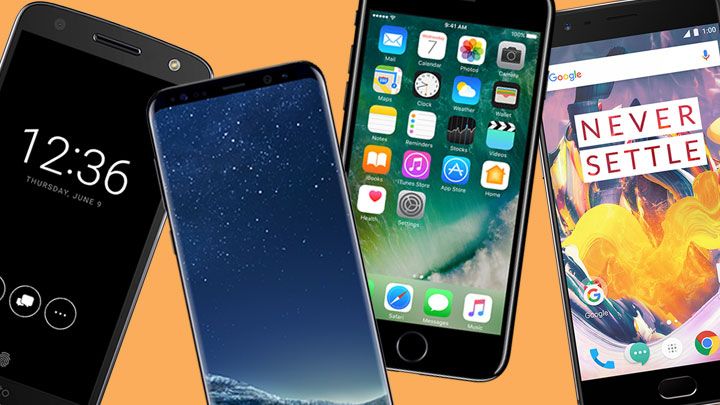
Best phone 2017: the 10 top smartphones we've tested


The HTC U11 and Sony Xperia XZ Premium have entered our list of top phones - where do they place against the Galaxy S8 and iPhone 7?

Thinking of buying a new phone? We've got the best smartphones of the moment all listed here - and we've got the Samsung Galaxy S8 and Samsung Galaxy S8 Plus handsets duking it out with the iPhone at the top of our list.

Here's the ranking we've spent hours whittling down to a top ten. We take into account the power, specs, design and, most importantly, value for money of each handset.
(If the price is too high, check out our list of the best cheap handsets that won't cost you more than £200).

Best smartphone

For those in a rush, here you go: the Samsung Galaxy S8 is the best smartphone in the world.

A new stunning design, amazing screen and great camera combined make it for the best phone you can buy right now. Be sure to take a look through the full best phone ranking though to know what's best for your needs.
Already know your favourite operating system? Then check out our best iPhone or best Android phone round ups to see which is for you!
Not fussed with what's below but not sure how long to wait for the next big hitters? Try our well-stocked iPhone 8 release date or Google Pixel 2 release date pages to help you out.
Find a good deal with TechRadar: mobile phone deals


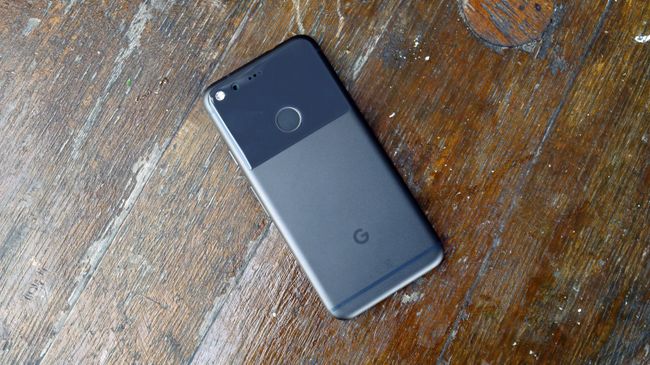
10. Google Pixel

The best phone for pure Android

Weight: 143g | Dimensions: 143.8 x 69.5 x 8.5mm | OS: Android 7.1 | Screen size: 5-inch | Resolution: 1080 x 1920 | CPU: Snapdragon 821 | RAM: 4GB | Storage: 32/128GB | Battery: 2770mAh | Rear camera: 12MP | Front camera: 8MP
The Google Pixel is an excellent flagship phone that's an impressive debut for Google as a manufacturer - and the new Assistant is a great Siri rival. If you're OK with the price point, the Pixel is a breath of fresh Google air in a world of Android over-complication. 


The 12MP camera on the back is one of the best on the market, while the clean, fresh Android Nougat interface is a joy to use.

There's heaps of power under the hood making it perfect for gaming and multi-tasking, while the bright, colorful screen provides an excellent viewing experience for your movies and TV shows.

It may not be the most attractive handset on the market but it's far from ugly... and what you can be sure of is a lot of bang for your buck.

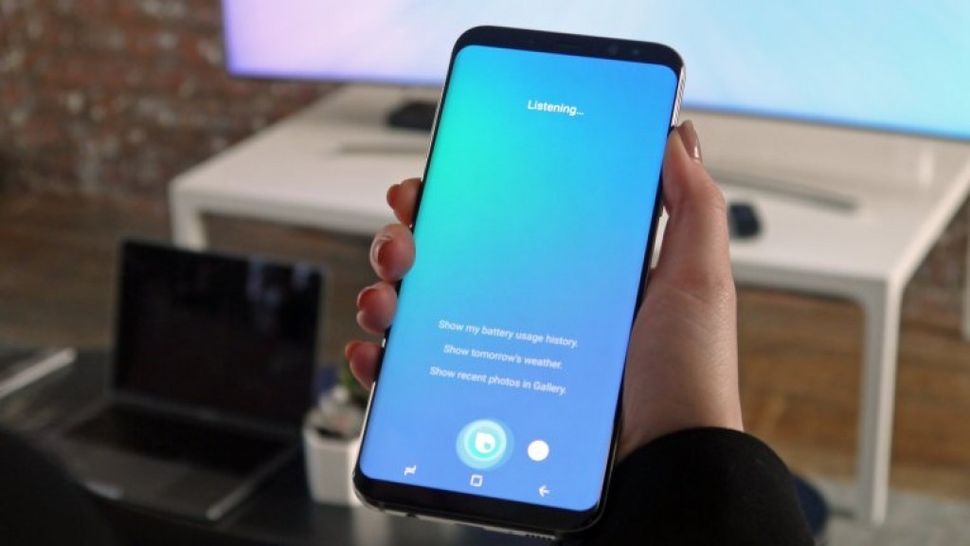
Samsung Galaxy S8 and S8 Plus get Bixby Voice sneak peek – if you're lucky


We're still waiting for Samsung's Bixby Voice to officially release, but the tech giant is offering a consolation prize of sorts for Galaxy S8 and Galaxy S8 Plus owners in the US.

The company today announced it's launching a "sneak preview" of Bixby's voice capabilities for those who own the phones stateside.

The so-called Bixby Early Access Program will give users a chance to test out the assistant's powers of understanding and responding to voice commands. Data gathered from the tests will be used to improve the quality of Bixby, Samsung says, and help develop new services.

If you're interested in signing up for the program, head to this page. Note "participation is limited," and it's not clear how many people Samsung is accepting or how long the preview will last.

Everything you need to know about the Samsung Galaxy Note 8
Bixby bides its time

This is in an intriguing development for Bixby and its much-needed but still missing voice capabilities in light of reports suggesting voice support will arrive later this month.

Bixby has been somewhat of black eye for the otherwise excellent Galaxy S8 and Galaxy S8 Plus from the start. Even though the phones launched with a dedicated Bixby button, the lack of voice support and generally mundane features have rendered the assistant essentially pointless.

So far, Bixby hasn't lived up to its billing as a Siri or Google Assistant competitor, but that could change once Voice becomes available and Bixby grows more intelligent over time.

It seems that as part of the Early Access Program, users will be able to use voice to send texts, change settings and make calls. Eventually, Bixby's voice powers will extend well beyond these basic functions, but we simply haven't seen these - or anything - yet. 

iPhone 8 release date, news and rumors


New renders show what the iPhone 8 might look like with the screen on and point to a dual-lens front-facing camera, while a sketch gives dimensions for the iPhone 8. The phone has also apparently entered mass production.

Apple's iPhone 8 release date is expected to be three months from now, and we're already 3D Touch deep into new rumors about its 2017 smartphone.

It's the tenth anniversary of the iPhone and the design is due for big changes. We haven't seen a brand new look in three years, so prepare to be wowed.

The most immediate change may be to the name: iPhone 8, iPhone X or iPhone Edition, instead of just iPhone 7S  and iPhone 7S Plus. This is a major refresh for Apple and its name deserves a giant leap.

Every iPhone 8 rumor really gives us a sense that Apple is overhauling its phone with at least one premium design – what we're calling the iPhone 8 – while also providing a basic specs bump for an iPhone 7S and iPhone 7S Plus.

We're sorting through all of the rumors to deliver the facts and cut through the far-fetched speculation, from the always-changing release date theories to the all-important iPhone 8 price.
What is it? The 10th anniversary version of Apple's iPhone
When is it out? September 2017 or maybe a bit later this year
What will it cost? More than the normal $649 (£599, AU$1,079)
iPhone 8 release date

Hottest leaks:

September 2017 launch for iPhone 7S and iPhone 7S Plus
Slightly later October 2017 date the curved, all-screen iPhone 8
The iPhone 8 release date is the routine new iPhone rumor we expect to stay the same every year, but Apple may do something different here, too.

Apple has launched a new iPhone in September every year since the iPhone 5 in 2012. September iPhone launches have a pretty consistent track record.

iPhone 7S and iPhone 7S Plus may still launch in September sporting a worthy, but ultimately predictable design and feature upgrade.

iPhone 8 may deviate from this plan by launching a little bit later (still before Christmas) with the biggest changes for Apple's smartphone in several years.

Why? iPhone 8 production is said to be running one to two months behind schedule – new tech takes time. This could mean delays or stock shortages.

Pre-register for iPhone 8
UK: Carphone Warehouse
We still expect Apple to have an iPhone launch event around September 8 and it could ship the 7S phones one week after CEO Tim Cook first holds them up in the air.

But it sounds like you'll have to wait – one or two extra months – for that snazzy iPhone 8's curved AMOLED display due to supply constraints, according to Bloomberg.

Can you wait until October or November? We're skeptical of all of the moving release dates, but we do keep hearing the disheartening rumor over and over, as there's evidence that Apple could be having issues with both the OLED display itself, and embedding a fingerprint scanner into it.

According to one leaker mass production has started though, so we shouldn't have too long to wait if true.

TechRadar's take: We keep hearing the disheartening rumor that Apple won't have the redesigned iPhone 8 ready at the same time as the still unconfirmed iPhone 7S and iPhone 7S Plus. We still expect a September launch event with all three phones present, but you may not be able to buy the the iPhone 8 (the phone you really want) until October.